
Inspect a photo without changing it
- Make the photo available on your phone. Use an original export if you want to investigate the source file rather than an edited or shared copy.
- Open MetaQuiet and choose Browse Files, or use Photos & videos for the library picker.
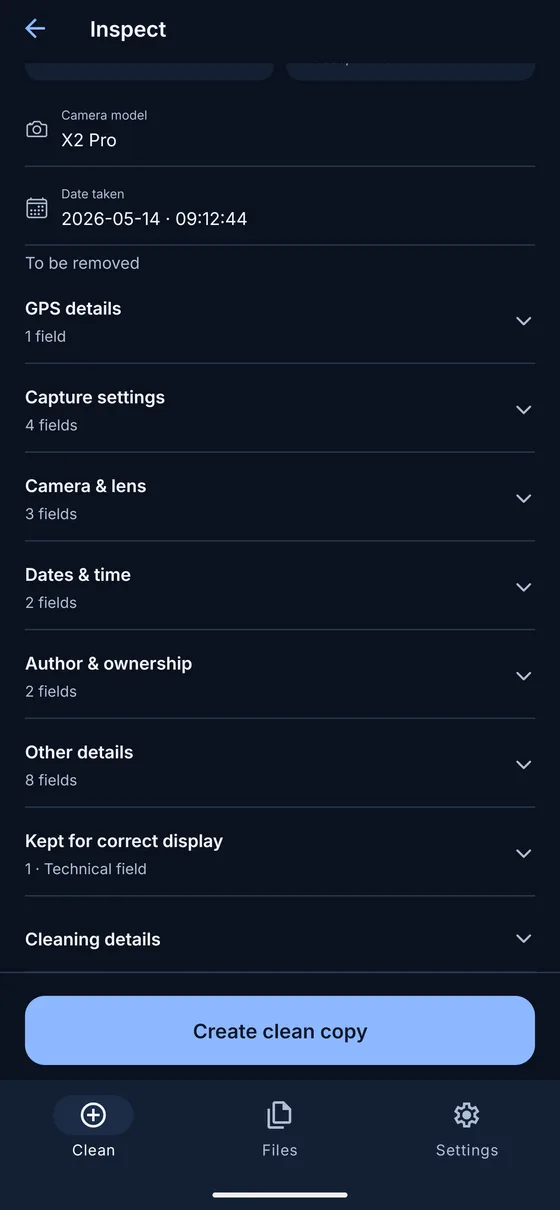
- Read the available field groups, such as Camera & lens, Dates & time and GPS details.
- Check which fields are marked for removal and which are kept for correct display. Read any incomplete-preview message.
- Stop after inspection if you only wanted to view the data. Creating a clean copy is a separate action.
Which details can appear?
Supported readable fields can include camera make and model, lens, capture date, exposure settings and author information. GPS fields may include coordinates and altitude. These are examples of supported labels, not a promise that every photo will contain each value.
Capture settings describe how the camera recorded the picture. Camera & lens identifies equipment when that information is stored. Dates & time can distinguish capture, creation and modification values. Read the field label rather than assuming every date means the moment the shutter was pressed.
The preview is selective. Detailed photo field reading is available for supported JPEG, PNG, HEIC and TIFF files. Other supported image formats may show removable metadata blocks without the same readable field detail. Cleaning support and detailed viewing support are not identical.
Why a photo can show no location
Android’s photo picker can hide GPS data before MetaQuiet receives the image. The app does not request media location access. If you used Photos & videos and see no location, do not conclude that the original was never geotagged.
Try Browse Files with an original export saved locally. If location remains absent, the selected file may lack readable coordinates, may have been changed earlier or may contain data outside the reader’s scope. MetaQuiet can only report what it reads from that copy.
Understand the map and missing fields
Readable coordinates can appear on a bundled offline overview map. Viewing that overview does not send them to a map provider. Only opening the detailed Apple Maps or Google Maps view shares the viewed area with that provider. The file itself is not sent.
An empty preview differs from a report that no supported removable blocks were found. A block can exist even when individual values are unavailable to the preview reader. If the app says the preview is incomplete, treat it as a limited inspection rather than a privacy certificate.
Metadata values can also be edited or carried over from another version of a file. A camera name, date or coordinate is a stored claim. The inspection does not authenticate the photographer or establish the history of the picture.
Decide what to do next
If the result contains supported details you do not want to share, follow the photo or location removal guide and create a clean copy. Orientation and other technical display information may remain. Anything visible in the photo remains too.
The photo limit is 25 MB, and unsupported variants may be rejected before inspection completes. RAW, AVIF and BigTIFF are unsupported. Renaming a file does not make its contents readable or convert it into a supported format.
Common questions
Do I have to clean a photo to inspect it?
No. You can read the inspection result and leave without creating a copy.
Can I use MetaQuiet to change a capture date?
No. MetaQuiet views supported values and removes supported metadata from copies. It does not edit individual fields.
Why do two copies of the same picture show different fields?
Photo providers, editors and sharing services may supply or create different versions. Inspection describes the selected file.
MetaQuiet is in testing on Android and iPhone. Join the testers to try it early.
Join the MetaQuiet testers