
Start by inspecting a file
- Choose a file already stored on your phone. If it is in cloud storage, download it before checking it offline.
- Open MetaQuiet and select Photos & videos or Browse Files. For an original photo export, use Browse Files.
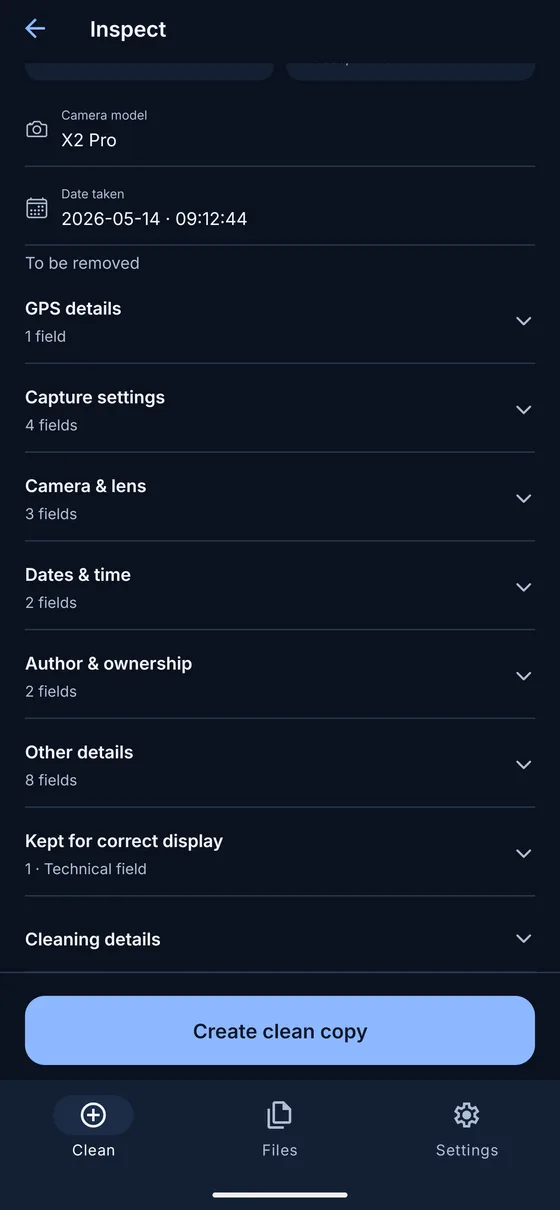
- Read the supported fields and metadata blocks in the inspection result. Notice which details are descriptive and which are kept for correct display.
- If you want to remove the supported metadata, create a separate clean copy. Open that copy and review its content before saving or sharing it.
Inspection does not require cleaning. You can read the result and stop there. MetaQuiet does not overwrite the original when you choose to continue.
What metadata can tell you
A photo may record the camera make and model, lens, capture time and GPS coordinates. For example, the picture might show an ordinary table while its location fields identify where it was photographed. These values are examples of possible metadata, not details that every photo contains.
A document can carry an author name, company, editing software and created or modified dates. A video may contain recording dates or descriptive container tags. Audio tags can hold an artist, title, album or comment without those words being spoken in the recording.
Metadata is useful for sorting and describing files, but a stored value is not proof of who created the content or where it came from. Fields may be missing, changed by software or edited before the file reaches you.
Descriptive fields and technical information
Some metadata describes the person, device or circumstances behind a file. Other information helps software display or play it correctly. A photo’s orientation tells a viewer how to rotate or mirror it. A color profile helps interpret its colors. Audio and video need decoding information.
MetaQuiet removes supported descriptive metadata while retaining information needed for correct display or playback. A clean copy can therefore still contain technical fields. Seeing an orientation record after cleaning does not by itself mean that GPS or camera details remain.
A field is not the same as a block
A field is an individual value, such as Camera model. A block is a container that may hold many fields. EXIF and XMP are examples of metadata structures. Removing one block can remove several descriptive values, so a block count is not a count of personal details.
A blank field preview can mean that values are absent or that the reader could not interpret them. A report of no removable blocks has a narrower meaning: no supported removable blocks were detected. Neither result proves that the whole file contains no private information.
What cleaning leaves behind
Faces, house numbers and text inside an image remain visible. Document comments, annotations and embedded files can also need separate review. A spoken address stays in an audio recording. Metadata removal does not redact content or inspect every possible place where information could be stored.
MetaQuiet handles one file at a time, with a general limit of 25 MB and a 5 MB limit for PDFs. Format variants have additional restrictions. Use the photo guide for EXIF removal or the document guide to understand properties, comments and embedded content before sharing.
Common questions
Does every photo contain GPS coordinates?
No. Location fields may be absent, removed or hidden by the file provider. Inspect the actual copy you intend to share.
Can metadata identify an author with certainty?
No. Author fields are stored values that can be changed. They are useful clues, not verified identity records.
Does a clean copy contain no metadata at all?
Not necessarily. Technical data and information outside the supported removal scope can remain.
MetaQuiet is in testing on Android and iPhone. Join the testers to try it early.
Join the MetaQuiet testers